Messages: Text SMS
- 4.2
- Rating
- 1.00M
- Installs
- Free
- Price
 Analysis by App-foxy
I spent time with Messages: Text SMS as a straightforward communication app, and its appeal became clear quickly: it keeps texting at the center instead of trying to turn every conversation into a social platform. For people who mainly need a familiar way to send and receive SMS messages, that focused approach can feel refreshing. The app is free, rated for Everyone, and developed by Phone call, so it sits comfortably in the everyday communication category rather than aiming at a specialist audience.
My review is especially concerned with how comfortably different people can read, navigate, and use it in real situations. A messaging app can be technically simple yet still frustrating when someone has reduced vision, limited dexterity, hearing-related needs, attention difficulties, or unreliable access to a data connection. Messages: Text SMS handles the basic idea well, but its usefulness depends heavily on the phone itself and on what each person expects from a modern messaging tool.
How the layout feels during ordinary texting
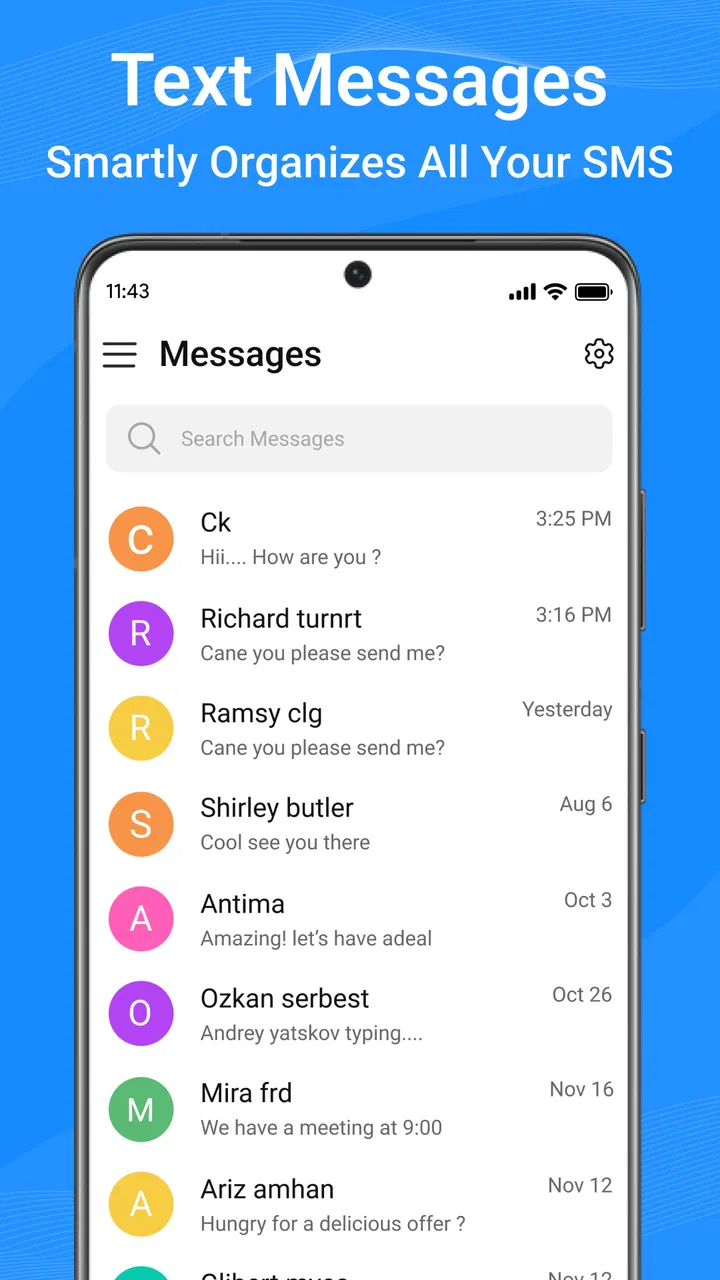
The first thing I noticed is that the app’s purpose is easy to understand. You open it to deal with text conversations, and that narrow focus reduces the mental effort involved in finding the right task. I did not have to work through a feed, discover contacts, or learn a complicated set of communication spaces before reaching a conversation. That makes it approachable for someone who wants a conventional SMS experience rather than a feature-heavy chat service.
You May Also Like

 Google Keep - Notes and lists
Google Keep’s Quiet Growth Shows the Appeal of Simpler Notes
As mobile work gets busier, Google Keep keeps winning a simple contest: capture a thought quickly, find it later, and get on with the day.

 Blood Strike: 2.5 Anniversary
Blood Strike’s Loadouts Turn Every Drop Into a Tactical Gamble
A close look at Blood Strike’s custom loadouts: how fast access to signature weapons reshapes its battle royale rhythm, rewards preparation, and narrows the gap between fights.

 Pandora - Music & Podcasts
Pandora’s Music Is Easy to Start, but Harder to Recover
Pandora’s strength is its low-effort path from a seed to a station. Its weak spot is how much confidence it asks you to place in connection, setup, and quiet recovery.

 8 Ball Pool
 Is Built on Rivalries, Rematches, and Routine
A close look at the rivalries, rematches, shared routines, and unanswered safety questions that turn a quick pool match into a persistent mobile community.

 Samsung Music
’s Quiet Strength Is Playing What You Already Own
Its reach comes less from spectacle than from dependable access to a personal library. That simplicity is both the app’s strongest retention engine and its ceiling.

 AccuWeather: Weather Radar
AccuWeather Review: A Quick, Clear Forecast for Everyday Decisions
For everyday plans, the best forecast is the one you can understand quickly. AccuWeather makes rain timing, radar, and local conditions easy to act on, with a few trade-offs.
More From Our News Desk



Readability is not only about the words on screen. It also depends on whether the conversation list gives enough visual separation between people, messages, and unread activity. In my use, the familiar structure of text messaging made the app relatively easy to follow, particularly for short exchanges such as confirming an appointment or asking someone to pick up groceries. The simpler the conversation, the more the restrained design works in its favor.
People with reduced vision will still need to judge the app alongside their phone’s own display settings and screen reader behavior. I would not treat the app as a substitute for system-level accessibility tools. Increasing the device’s text size, display contrast, or magnification before relying on the app is a sensible first step. That approach also helps reveal whether the interface remains comfortable when labels and message text become larger.
Navigation matters just as much as visual clarity. For a person who finds dense screens tiring, a focused SMS application can be less demanding than a service that combines messaging with stories, channels, media feeds, and promotional panels. I found that useful when I wanted to answer quickly without being distracted. It is a small advantage, but one that becomes meaningful over many daily conversations.
The app’s current version is 1.54, and it supports devices running Android 7.0 or later. That broad operating-system reach may help people who keep an older phone instead of replacing it frequently. It also means the app can be relevant in households where not everyone has a recent device. Still, an older phone may have its own limitations around screen quality, responsiveness, or built-in accessibility controls, so the app cannot solve every usability issue by itself.
Useful habits for clearer conversations
I found that the best way to make a text-focused app work for different reading needs is to establish a few habits outside the app as well. Keeping messages short and placing the key detail near the beginning makes conversations easier to scan. If I were texting someone who uses large text or magnification, I would avoid sending one long block when several clearly separated messages would be easier to review.
Another practical habit is to use descriptive contact names in the phone’s address book. A message list is much easier to interpret when names are recognizable instead of relying on unfamiliar numbers. This is particularly helpful for people who process information more slowly or who need to confirm a recipient visually before replying. The app benefits from that preparation, even though the contact organization itself belongs largely to the phone.
I also recommend checking the app in both portrait and landscape orientation if a user has a preferred viewing position. Someone with limited visual field, a mounted phone, or a particular hand position may find one orientation more comfortable. The important point is not to assume that the default arrangement will suit everyone.
Motor, sensory, and cognitive considerations
Texting can be difficult for reasons that have nothing to do with understanding the words. Small touch targets, accidental taps, awkward hand positions, and the need to make repeated corrections can turn a simple reply into a tiring task. Messages: Text SMS is most appealing here when the user wants a direct route to ordinary texting, but the actual physical experience will vary with the phone, keyboard, and system settings.
For users with limited finger movement or tremors, I would pair the app with the keyboard that feels most forgiving on the device. Larger keys, voice input, one-handed layouts, or an alternative keyboard may make a bigger difference than changing messaging apps. The app’s value is that it does not force the user into a separate communication ecosystem; they can choose the input method that already works for them.
That flexibility also matters for people who cannot comfortably hold a phone for long periods. A mounted device, a stand, or a preferred orientation can make reading and replying less strenuous. In a realistic situation, someone cooking with one hand available could read a short message and dictate a response through the phone’s input tools, provided those tools are configured and reliable on the device. I would test that workflow before depending on it for important communication.
For people with hearing loss, an SMS app has an obvious practical strength: the conversation is written rather than dependent on an audible ringtone or spoken exchange. A user can communicate without needing to hear a call clearly, and written instructions can be checked again later. That makes texting useful for appointment details, addresses, medication reminders, or a family member’s travel update.
However, written communication is not automatically accessible for everyone. Some users find dense text difficult to process, while others have language, reading, or cognitive challenges that make ambiguous messages stressful. In those cases, the sender’s style matters. I would use plain wording, one request at a time, and clear time references. Messages: Text SMS can carry that kind of communication, but it cannot rewrite an unclear message into an easier one.
There is also a social accessibility angle. SMS is widely understood, which means a person may be able to communicate with contacts who do not want to install another service. That reduces the burden of persuading family members, a school, a workplace, or a local business to join a particular platform. For someone who values compatibility over novelty, this is one of the app’s strongest practical reasons to exist.
A realistic everyday scenario
Imagine a person with hearing-related needs arranging a medical appointment while also managing a busy afternoon. They can use the app to send a concise request, keep the reply in the conversation, and reread the time or location later instead of relying on a phone call. If the phone is set up with larger text and the contact has a clear name, the whole exchange can be easier to verify than a rushed spoken conversation.
Now consider a different user: someone with limited dexterity who needs to tell a family member that they arrived safely. The app itself provides the communication channel, while the phone’s keyboard or voice-input features handle the physical act of composing the message. This division is important. Messages: Text SMS is useful because it stays compatible with ordinary texting, but the accessibility of the complete workflow depends on the surrounding device and input tools.
Access when circumstances are less than ideal
Communication apps are often judged at home, yet their real value appears when a person is moving between places, dealing with stress, or using an older handset. SMS can be a practical choice in situations where the recipient may not use the same internet messaging service. That makes this app more suitable for mixed households, occasional contacts, and essential short updates than a platform that requires everyone to share an account.
For older adults, the combination of a familiar texting model and a free price removes two common obstacles. There is no purchase decision to make before trying it, and the Everyone age rating keeps the app within an ordinary family communication context. I would still help a less confident user configure the phone first: enlarge text if needed, place the app somewhere easy to reach, and practice sending a message to a trusted contact before using it for an urgent task.
For people who travel between areas with inconsistent connectivity, the distinction between SMS and internet chat can matter. A text-focused app may be more useful than a data-dependent alternative when the recipient’s connection is uncertain. At the same time, users should remember that the quality and availability of texting can depend on the mobile service and the phone’s signal. The app cannot guarantee delivery in a place where the device cannot connect to its network.
Situational access also includes noise, glare, low light, and privacy. A person in a crowded station may prefer written communication because listening to a call is difficult. Someone in a quiet workplace may need to avoid audible interaction altogether. On the other hand, reading a screen in bright sunlight or while walking can be uncomfortable and unsafe. I would not recommend composing messages while moving through traffic or other hazards; the app is convenient, but it does not remove the need to pay attention to the surroundings.
One less obvious advantage is the ability to keep a written trail of practical information. When someone sends a gate code, meeting point, or change of plans, I can return to the conversation instead of relying on memory. That can support users who benefit from external reminders. It is not a dedicated planning or reminder system, though, so important details may still deserve a separate note or calendar entry.
Where the experience still creates friction
The app’s simplicity is helpful, but it also sets a boundary. People who expect rich group collaboration, extensive media tools, reactions, or a broad internet-chat ecosystem may find a conventional SMS application too limited. If your friends and family already communicate through a service built around shared photos, voice notes, or large group spaces, that service may be the better primary tool.
Another limitation is that accessibility cannot be judged from the messaging function alone. Text size, touch response, voice input, screen reading, vibration, notification behavior, and display contrast are influenced by the Android phone and its settings. Two people can therefore have noticeably different experiences with the same app. I would test the complete setup using the exact phone, keyboard, and notification preferences the intended user will rely on.
Notifications deserve particular care. A person with sensory sensitivities may not want frequent sounds or vibrations, while someone with memory difficulties may depend on a noticeable reminder that a message arrived. The right balance is personal. I would adjust notification behavior during a quiet test period rather than waiting until an important message is missed or becomes overwhelming.
There is also a risk in assuming that written messages are always easier than calls. A user with reading fatigue may prefer a brief call from a trusted person, while someone with speech or hearing difficulties may strongly prefer text. The app is therefore not universally inclusive simply because it is text-based. Its best fit is for people whose communication needs align with written, asynchronous exchanges.
Privacy expectations can create another decision point. A user may choose SMS because it reaches more contacts, but that convenience is different from choosing a specialized service for private, feature-rich conversations. I would use Messages: Text SMS for ordinary coordination and direct updates, while considering a different communication method when a group needs advanced collaboration or when everyone already relies on another platform.
How it compares with familiar alternatives
Compared with a manufacturer’s default messaging app, Messages: Text SMS feels most attractive to someone who wants a dedicated, uncomplicated texting experience on a compatible Android phone. The usual preinstalled option may integrate more tightly with the handset, so users who depend on a specific phone feature should compare both before switching. The third-party app’s advantage is not that it transforms texting; it is that it keeps the task focused and easy to approach.
Compared with internet-based messengers, its strongest point is reach. You do not need every contact to adopt the same service simply to exchange ordinary texts. That can be valuable for family members with different phones, occasional contacts, or organizations that only communicate by SMS. Internet messengers may be better for large groups, media sharing, live presence indicators, or conversations where everyone already uses the same platform.
Compared with phone calls, texting gives the user more control over timing and creates a written reference. That supports people who need extra time to read, compose, or check information. Calls remain better for urgent back-and-forth discussion, emotional nuance, or situations where typing is physically demanding. I would not use this app as a replacement for every form of communication.
The app has attracted more than a million installs and holds a 4.3 average from around thirty-one thousand ratings. Those figures suggest that it has reached a substantial audience and that many users find the basic experience worthwhile, but they should not replace a personal accessibility test. A rating cannot tell me whether the text is comfortable for a particular reader, whether touch targets suit a particular hand, or whether notifications fit a particular sensory profile.
Who should choose it, and who should look elsewhere
I would recommend Messages: Text SMS to someone who wants free, ordinary texting with a focused interface, especially if their contacts are not all on one internet messaging service. It is also a sensible option for households that include older phones or users who prefer written communication because calls are inconvenient, difficult to hear, or too demanding in the moment.
I would be more cautious for a person who needs intensive customization, a fully documented accessibility workflow, or sophisticated collaboration features. In that case, the better choice may be the phone’s established messaging tool, a messenger with stronger group and media support, or an assistive communication solution selected for the individual’s specific needs. The important distinction is that this app offers a practical communication path, not a complete accessibility system.
Before committing, I would run a short personal test: read several conversations with the preferred text size, send a message using the usual input method, check whether notifications are comfortable, and confirm that the intended contacts can receive ordinary texts. That test answers more useful questions than a general rating because it reflects the user’s actual phone, habits, and environment.
A focused texting choice with realistic limits
My overall impression is positive, mainly because the app understands the value of staying focused. It does not ask a person to learn an elaborate communication environment before sending a simple message. For many users, that simplicity improves readability, reduces navigation effort, and makes texting easier to fit into daily routines.
Its inclusive value is strongest when combined with the phone’s own accessibility settings and a thoughtful communication style. Larger text, a suitable keyboard, clear contact names, concise messages, and carefully chosen notifications can turn a basic SMS workflow into a comfortable one. Those improvements are practical, but they require setup and do not come automatically from the app.
My recommendation is to choose it for dependable, low-friction texting, not for a feature-packed social messenger. It is free, supports a wide range of older Android versions, and suits people who value compatibility and written communication. If your needs center on advanced group work, rich media, or deep accessibility customization, another option may serve you better. For straightforward everyday SMS, though, Messages: Text SMS is an approachable choice that earns consideration without pretending to solve every communication barrier.
FAQs for Messages: Text SMS
01What features does the Messages: Text SMS app offer?
Messages: Text SMS provides a comprehensive messaging experience with features like advanced search options, customizable themes, group messaging, and multimedia support. It also includes spam protection and quick reply features to enhance user convenience. Additionally, users can personalize notifications and use emojis to enrich communication.
02Is Messages: Text SMS secure for personal communication?
Yes, Messages: Text SMS incorporates various security features to protect user data. It supports end-to-end encryption for text messages, ensuring that only the sender and recipient can read them. Regular updates also address security vulnerabilities, providing a secure platform for personal and group chats.
03Can Messages: Text SMS be used on multiple devices?
Currently, Messages: Text SMS is primarily designed for mobile devices. However, users can sync their messages to a companion desktop app or web client, depending on the platform's availability. This feature allows users to view and send messages from their computers, offering flexibility across devices.
04Does Messages: Text SMS support multimedia sharing?
Absolutely! Messages: Text SMS allows users to send and receive various multimedia content, including images, videos, voice messages, and GIFs. This feature makes it easy to share memorable moments with friends and family. The app also supports large file transfers, though this may depend on network limitations.
05Are there any costs associated with using Messages: Text SMS?
The Messages: Text SMS app itself is typically free to download and use. However, users should be aware that sending SMS or MMS messages might incur charges depending on their mobile carrier plan. It's advisable to check with the carrier for any potential messaging fees to avoid unexpected costs.
Pros
- Intuitive and user-friendly interface.
- Supports multimedia messaging.
- Offers customization options.
- Reliable delivery notifications.
- Low data consumption.
Cons
- Limited advanced features.
- Ads can be intrusive.
- No end-to-end encryption.
- Lacks integration with other apps.
- Occasional delivery delays.

Messages: Text SMS
Gallery